Moonlight Commander
The two-pane file manager for macOS in the style of Norton Commander. Fast, fully keyboard-driven, free.
Download for macOS (DMG, approx. 4 MB)
Free and open source (MIT) · macOS 14 or later · Apple silicon · signed and notarized by Apple
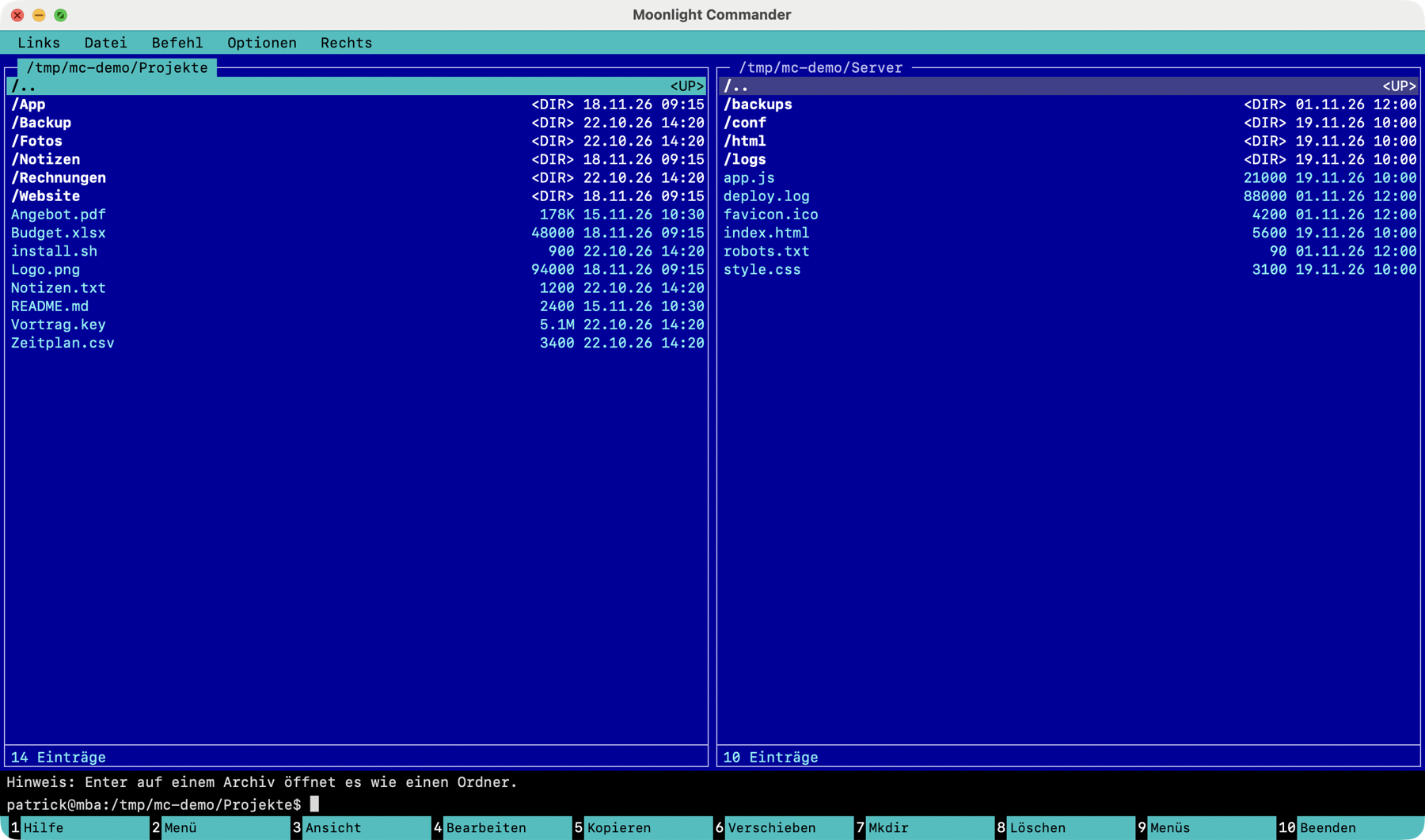
What the app can do
- Two panels, full keyboard controlCopy, move, delete and rename with F5 to F8, masks like *.bak, selecting by pattern, quick search.
- SFTP and FTP/FTPSOpen servers like local folders and copy files between your Mac and the server. SSH aliases and keys from ~/.ssh work, and passwords can be stored in the keychain.
- A real terminalCtrl-O opens a shell in the active panel's folder, or an ssh session on the server for SFTP panels.
- Viewer and editorSyntax highlighting, hex view, regex search, diff, Markdown and HTML preview.
- Archives as folderszip, tar, 7z, rar, iso and more open with Enter like a directory.
- Live updatesLocal panels reload automatically when the folder changes from outside.
- Three color schemesNorton Blue, Dark and Light.
Essential keys
| Tab | Switch panel |
| F3 / F4 | View / Edit |
| F5 / F6 | Copy / Move |
| F7 / F8 | Create folder / Delete |
| ⌘K | Connect to an SFTP or FTP server |
| Ctrl-O | Show or hide terminal |
| ⌘D | Directory hotlist |
The F-keys need "Use F1, F2, etc. keys as standard function keys" in the keyboard settings, or the Fn key. All functions are also available in the menu bar (F9).
Installation
Open the DMG and drag "Moonlight Commander" to "Applications". On first launch, macOS only asks whether you want to open an app downloaded from the internet.
Open source
Moonlight Commander is released under the MIT license. The source code is on GitHub, along with all versions as Releases.
The code was written with AI-assisted software development (using Claude Code by Anthropic) and was designed, reviewed and tested by Patrick Dörn.
Report bugs
The project takes bug reports and feature requests on GitHub as an issue. Without a GitHub account you can reach me via the details in the legal notice.
Privacy
The app has no ads, no tracking and no accounts. It only checks for new versions with your consent (without personal data); otherwise connections are only made when you open a server yourself. Details in the privacy policy.